
Abandoned carts are pain, frustration, and lost revenue. GA4’s interface barely shows them. BigQuery shows everything - but with quirks. So grab your analytical hard hat and get ready to write some SQL.
What’s an abandoned cart?
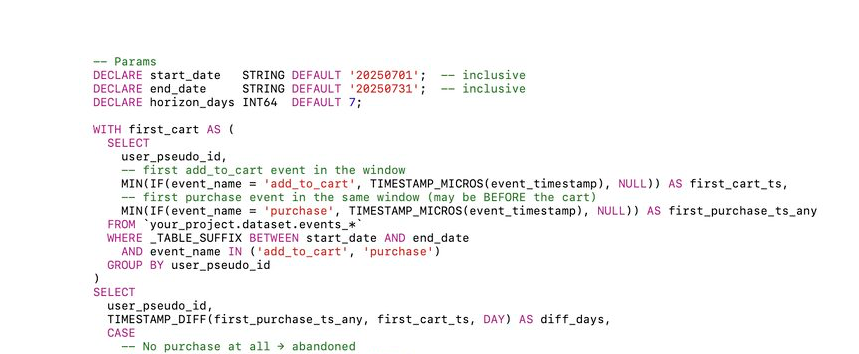
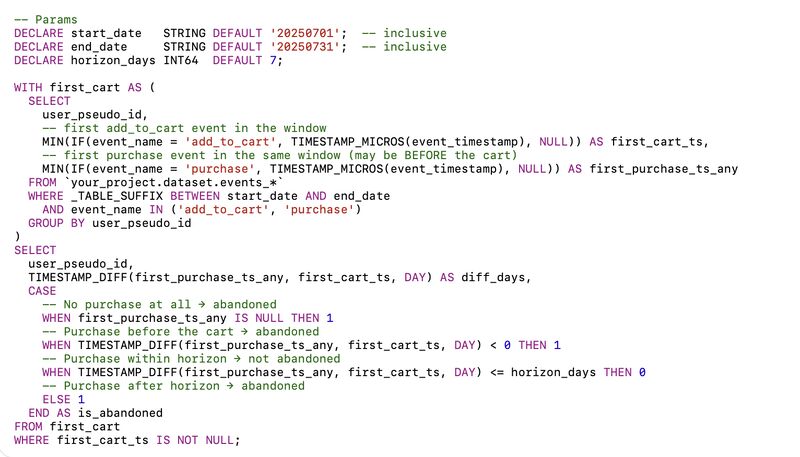
A user added a product to their cart (add_to_cart) but never completed a purchase (purchase). Sounds simple: find add_to_cart events without purchase - done, right? Not quite.
How it works in BigQuery:
1. Filter for users who triggered add_to_cart.
2. Check if they had a purchase event afterward (or at all).
3. If not - congrats, you've got an abandoned cart.
Smarter approach:
• Group by user_pseudo_id or session_id
• Identify sessions or users that had add_to_cart but no purchase
• Go deeper by checking item_id to see exactly what was abandoned (and cry a little)
Tip: item_id to count specific products, not just cart events
Takeaway:
GA4 might show “something was added.” BigQuery will tell you exactly who abandoned the cart - and how much revenue you lost. And SQL? That’s your therapy. And your way to show the marketing team where it really hurts.
Want all my posts in one place? I put 350+ articles on GA4, BigQuery, attribution, and metrics into one searchable library.
Go here to explore it for FREE.